 Commandix
Commandix guide
Find and Relieve Project Bottlenecks
Start with a slipping result, test where the work is waiting, and choose a change that could improve delivery. This guide explains the detection signals, their limits, and how to decide between Exploit, Subordinate, and Elevate.
Last reviewed September 20, 2026
New workspace? Check data readiness. A candidate is already shown? Validate it. Ready to act? Compare the three action types and use the worked review example.
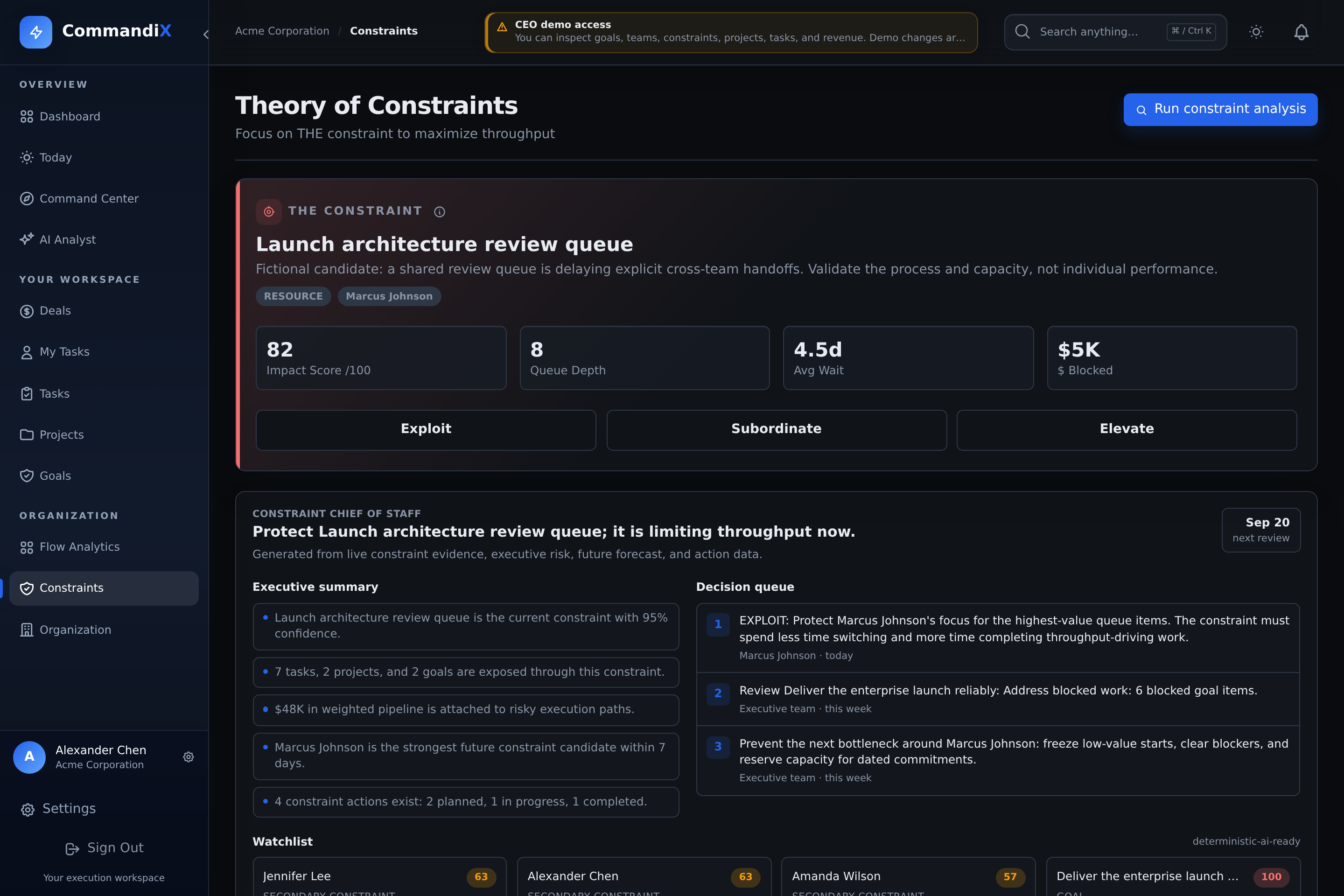
View this screen in Commandix
 Enlarge
Define the result before choosing the constraint
Write down the outcome that is late, its acceptance condition, and the next commitment. For example: three pilot customers need approved access before their handoff dates. Then identify the projects and tasks that deliver that outcome. A busy person elsewhere in the organization may not be limiting this result.
A constraint is the limiting part of the system you are trying to improve. An individual blocked task can be a local interruption without limiting the wider flow. The current automatic analysis primarily ranks assigned work queues by person. A named queue is a place to investigate, not a judgment about that person's effort or competence. Policy, demand, supplier, and external approval constraints still require human investigation.
The management sequence is to identify the limiting point, protect its useful capacity, make surrounding work support that decision, add capacity if necessary, and reassess when the limit moves. This follows the Five Focusing Steps described by Goldratt Research Labs. The examples below are practical review patterns, not automated Commandix rules.
Prepare data before trusting the ranking
| Check | Why it changes the diagnosis | What to do |
|---|---|---|
| Ownership | Unassigned work is not attributed to a person's candidate queue. | Review department queues and assign executable work. Do not assign everything to one coordinator merely to populate the chart. |
| Statuses | Planned, Active, and Blocked work enter open queues. Stale Active records inflate pressure. | Update real states, resolve old blockers, and retain Done and Cancelled as distinct outcomes. |
| Estimates and hierarchy | Fallback estimates and parent/child overlap can distort queued hours. | Inspect the estimation limits. Reconcile the actual task list before drawing a capacity conclusion. |
| Capacity and WIP assumptions | Hours and active counts are compared with stored weekly capacity and work-in-progress limits. | Check whether the displayed assumptions match the person's role and availability. Ask an administrator or support to review incorrect stored values. These are not edited in the action dialog. |
| Blocking evidence | A reason that says only "waiting" cannot explain the missing decision. | Record the blocked task, missing input, responsible party, and dependency. Review wording with the team. |
| Business links | Missing project, goal, or deal links make affected work harder to trace. | Connect the records that actually belong together. Do not create revenue links solely to raise a score. |
| Completion history | Cycle-time comparisons need recorded completed work and meaningful status history. | Keep current status updates. Do not fabricate historical transitions to populate a chart. |
Run analysis and inspect the candidate
- Open Constraints. This workspace is available to owners and eligible unit managers or heads, subject to account access.
- Select Run Constraint Analysis after reviewing the underlying task data.
- Read the named queue, impact score, queue depth, displayed wait estimate, and value figure. Note the date and the result you are investigating.
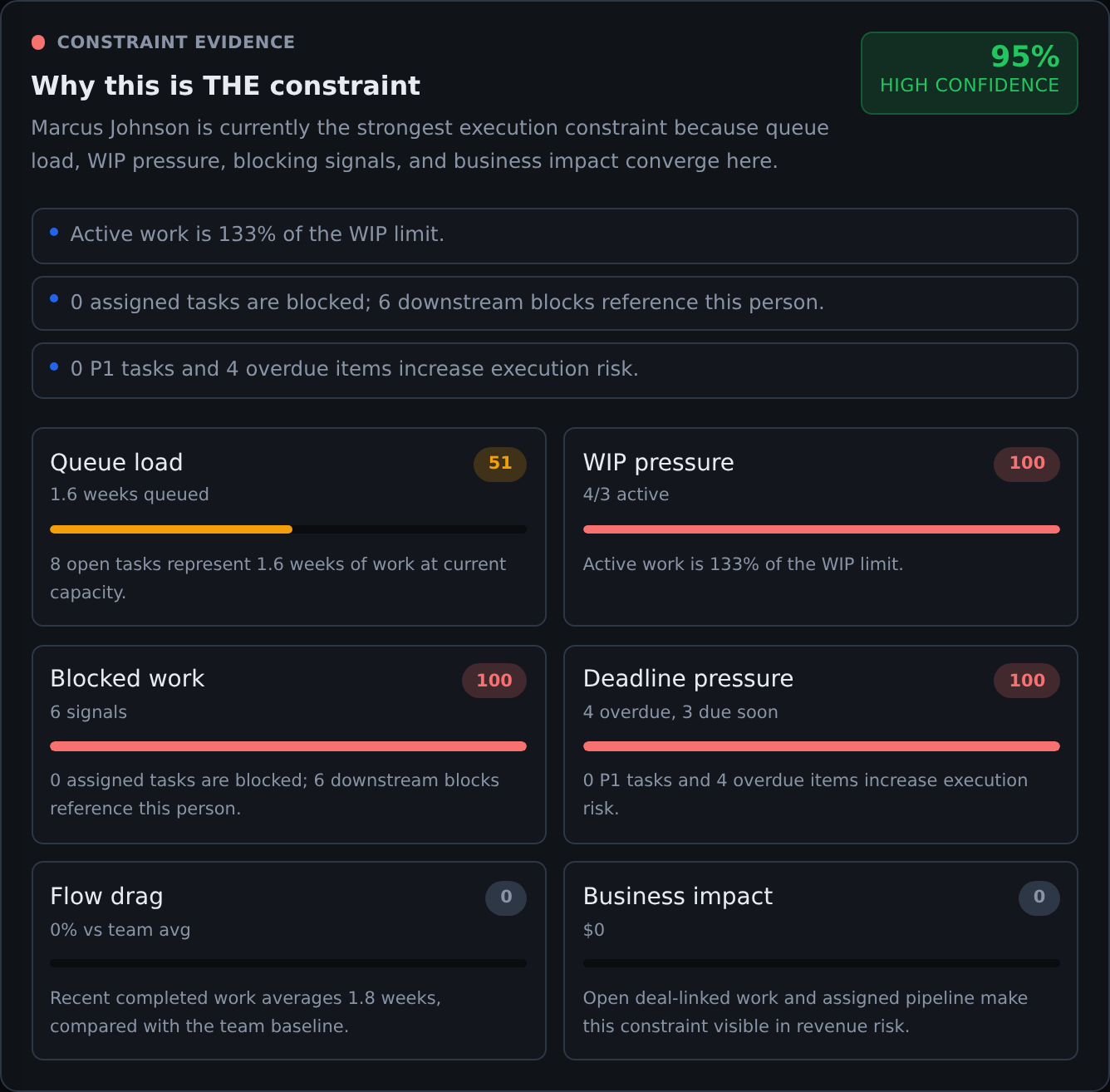
- Read Constraint Evidence, the confidence band, and the comparisons with other candidates.
- Open affected project and goal links. Check task records and speak with the responsible team before selecting a change.
Running analysis is a write operation: it records a new analysis result and measurements, and changes existing active detection records. It is not just a browser refresh. Historical records can be marked Resolved when an analysis is replaced. That status alone does not prove the operational problem was solved. Existing actions stay attached to their original constraint record.
Read the numbers without treating estimates as facts
| Signal | Current meaning | Interpretation limit |
|---|---|---|
| Impact score | A capped 0-100 queue-pressure indicator. Detection combines queue size, estimated load relative to capacity, WIP pressure, blocking mentions, and recent cycle-time signals. | It is not a probability or percentage of the business affected. Different candidates can both display 100 while their underlying ranking differs. |
| Queue depth | The number of assigned open tasks, including Planned, Active, and Blocked records. | This is broader than a count of tasks physically waiting at an approval desk. Inspect the statuses and hierarchy. |
| Queued hours / weeks of work | Estimated open load compared with stored weekly capacity. Evidence calculations use a four-hour fallback for missing or zero task estimates. | This is not measured remaining effort or a guaranteed completion date. The initial detection and evidence views have different fallback calculations for partially estimated queues. |
| Average wait | The detection card stores a proxy based on weeks of queued work multiplied by 40 hours. | It is not the observed mean time tasks spent waiting. Use task history and flow metrics to investigate actual elapsed delay. |
| Blocked value / throughput impact | A queue-value proxy based on estimated queued hours and a salary-derived or fallback hourly rate. | It is not booked revenue, measured loss, or cash recovered by an action. |
| Revenue at risk in Business exposure | A separate estimate using linked or assigned open deals and their probabilities. | Unlinked commercial effects may be missing. Confirm amounts and currency context in Sales before making a financial claim. |
| Confidence | A heuristic evidence-strength score using signal agreement, available history, and candidate separation. | An 80% score is not an 80% statistical probability that the diagnosis is correct. |
 Enlarge
Validate the candidate before changing the organization
Use the evidence panel to form a testable explanation: "Accepted pilot work is waiting for the same security review, and interrupted review capacity is delaying customer handoffs." Then look for records that could disprove it. Perhaps the review is actually waiting for incomplete submissions, or the customer has not supplied the required input.
- Inspect the queue. Are the waiting tasks ready for this person to work on? Separate ready demand from work still missing inputs.
- Trace the effect. Which unfinished tasks and commitments actually depend on that work? A large unrelated backlog is not enough.
- Check alternatives. Could missing acceptance criteria, repeated rework, a policy decision, or a supplier explain the same delay?
- Compare candidates. Inspect the next plausible queue and whether its delays affect the same outcome.
- Agree a small test. Choose one change, one owner, a review date, and evidence that would support or reject the explanation.
The evidence band is High at 80 or more, Medium from 60 to 79, and Low below 60. High means the heuristic signals are stronger, not that validation can be skipped. With Medium, check the missing history or competing explanation before a costly action. With Low, repair data or observe a smaller queue and use a reversible test before a major staffing or process decision.
Current detection and the richer evidence panel are related but different calculations. Evidence also considers explicit blocker records, deadline pressure, and business exposure. Its factor weights are explanatory, not a formula you can use to reproduce the displayed detection score by averaging the bars. Named blocker mentions can also be ambiguous, so verify the actual handoff.
Choose Exploit, Subordinate, or Elevate
Choose the action type from the failure mechanism you have validated. The buttons categorize your management action. They do not automatically change assignments, enforce a WIP limit, reserve capacity, approve spending, or execute the proposed work.
| What the evidence shows | Choose | Reason and watch-out |
|---|---|---|
| The scarce review step has capacity, but interruptions, missing preparation, or low-value work consume it. | Exploit | Recover useful output from existing capacity. Do not interpret this as asking someone to work longer or skip quality controls. |
| Other teams release more work than the review can absorb, change priorities, or send incomplete inputs. | Subordinate | Change the surrounding release and handoff rules to support the selected queue. Avoid simply relocating the backlog and calling the problem solved. |
| Ready demand still exceeds demonstrated capacity after protection and release changes. | Elevate | Consider additional capability, automation, training, outsourcing, or process redesign. Check lead time, cost, quality, and the likely next limiting step. |
| The queue is poorly recorded, the candidate does not affect the outcome, or the explanation is unclear. | Investigate first | None of the three buttons substitutes for a defensible diagnosis. Correct records and validate a cause before escalating investment. |
Exploit: protect the useful capacity you already have
Suppose a specialist can review ready evidence, but spends the review window collecting missing documents and answering unrelated requests. A useful Exploit action is to protect a short review window and move preparation work to someone who does not need that specialist's judgment.
- Change: agree a ready-to-review checklist and a ranked queue. Give the specialist complete inputs and reduce avoidable switching.
- Record in Commandix: an Exploit action explaining the hypothesis, plus assigned tasks for preparing evidence and resolving missing inputs.
- Check: accepted reviews per comparable period, ready items waiting, oldest ready item, and rework. Track measures not available as app charts in task comments or your review notes.
- Stop or revise: if the reviewer is still waiting for inputs, address that readiness problem. If completed review quality falls, restore the guardrail instead of rewarding raw counts.
Subordinate: change what surrounding teams release
Suppose protected review time helps, but three teams continue to submit urgent work at once. A Subordinate action could require a ready input package and an agreed priority decision before another review enters the active queue. This is an operating agreement maintained by managers, not an automatic Commandix gate.
- Change: coordinate upstream starts and submissions with review capacity. Keep unreleased work Planned and make the ordering decision explicit.
- Record in Commandix: a Subordinate action, predecessor links, and tasks for the agreed readiness checks. Update dates only after reviewing the resulting commitments.
- Check: overall handoff completion, end-to-end waiting, upstream accumulation, and exceptions. A smaller local queue is not enough if the same work now waits invisibly elsewhere.
- Trade-off: some teams may start fewer tasks or appear less busy. Agree that accepted delivery, not local activity, is the review's success criterion.
For the underlying project-management rationale, see Goldratt UK's guidance on limiting concurrent work and staggering releases. The policy and thresholds for your team must be chosen from your own demand and delivery context.
Elevate: invest when the remaining gap is evidenced
Suppose submissions are ready, interruptions are controlled, and the same kind of accepted work still arrives faster than it can be reviewed. An Elevate action could qualify a second reviewer or automate a repeatable verification step. Training and validation may initially consume the same scarce capacity, so include that cost in the decision.
- Before approving: compare sustained ready demand with demonstrated completion, identify the skill or policy gap, and agree who accepts the investment and its risks.
- Record in Commandix: an Elevate action with the decision, expected effect, review window, owner, and linked delivery tasks. The action form is not a procurement approval workflow.
- Check: time until the new capacity is usable, accepted output, quality, and the next downstream queue. More local capacity is useful only if the desired result improves.
- Reconsider: if the demand spike is temporary, the actual limit is a missing decision, or the work is no longer required. A capacity purchase is not the only possible intervention.
Record an action with a hypothesis and a review plan
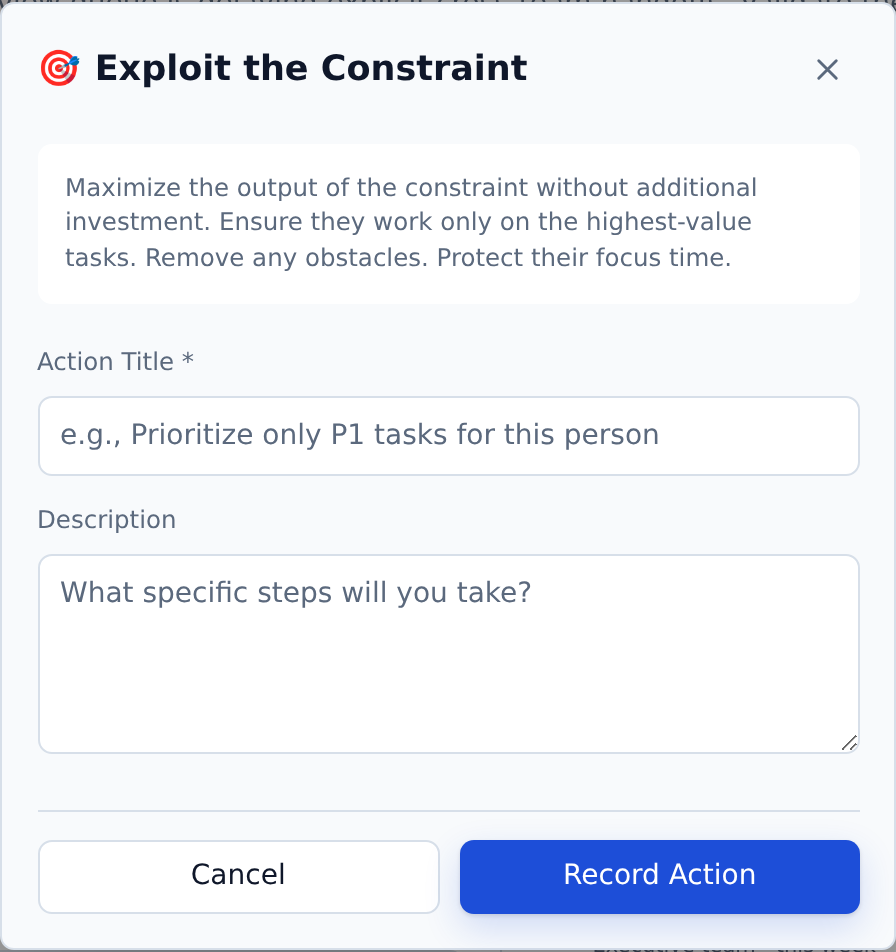
- On Constraints, select Exploit, Subordinate, or Elevate. Alternatively, open Actions and select Record Action when a current constraint is available.
- Enter a specific title and description. The visible form records type, title, and description. It has no dedicated owner, review-date, or success-target fields.
- Put the owner, baseline, review date, expected change, and guardrails in the description. Create ordinary assigned tasks for the execution work and include their links.
- Select Record Action. It starts as Planned and is linked to the selected constraint. Where evidence is available, creation captures the before snapshot.
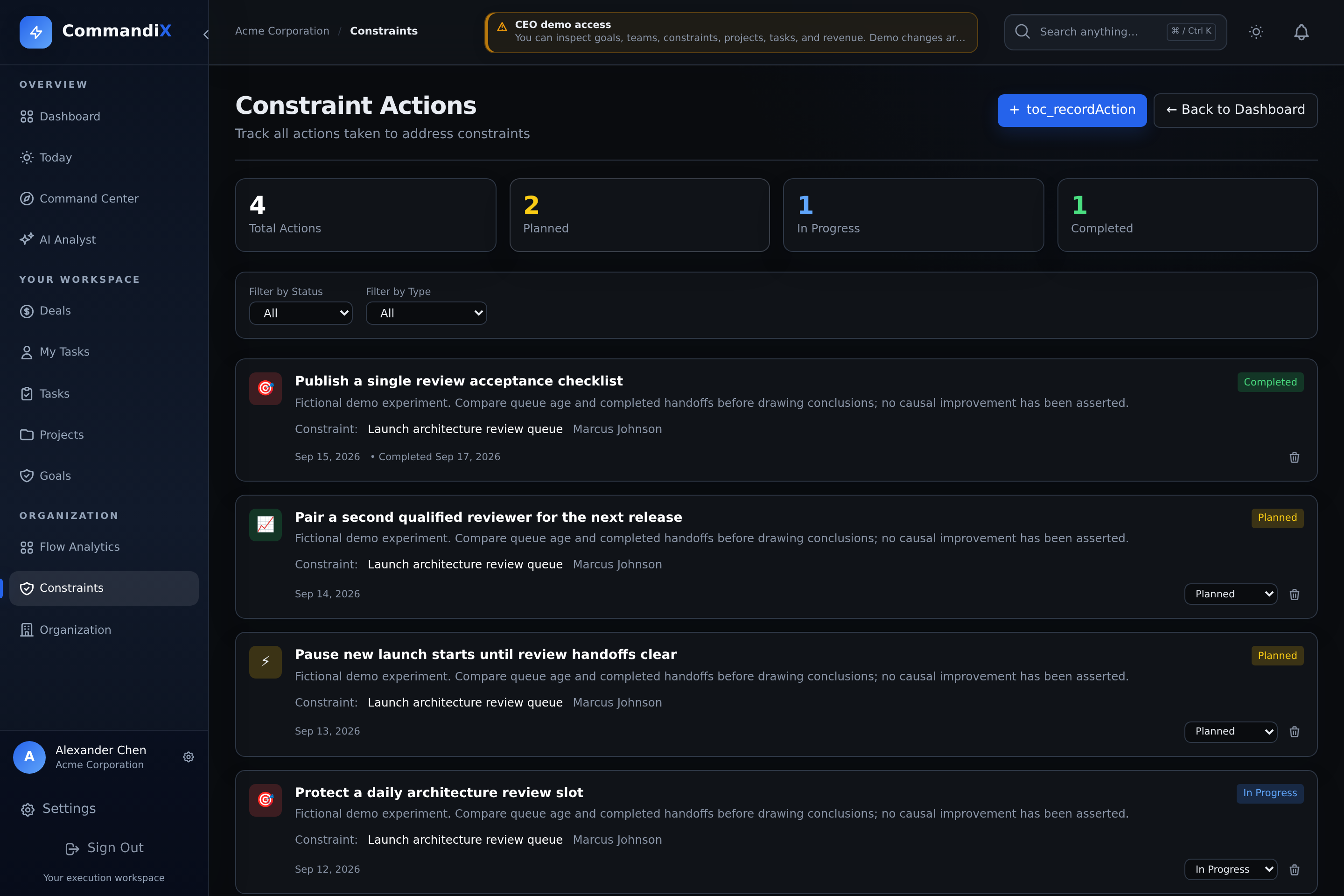
- In Actions, use the status selector to mark In Progress when work starts. Review the result before choosing Completed or Cancelled.
Result at risk: [outcome]. Hypothesis: [cause and supporting task links]. Change: [one intervention]. Owner: [name]. Baseline: [scope, dates, measures]. Review: [date and comparable period]. Success signal: [accepted result]. Guardrail: [quality or service condition]. Stop/revise if: [counter-evidence]. Execution tasks: [links].
 Enlarge
 Enlarge
Creating an action changes the action record and may change the constraint's lifecycle state. It does not perform the intervention. Suggested next action types can reflect earlier action types, so they are prompts for review, not proof that the previous step succeeded. The Actions page has no general edit form for revising a saved description. If the plan was wrong before completion, cancel it and record a corrected action. Avoid deleting the evidence trail merely because a test did not help.
Measure the result, not just action completion
Completing an action attempts to capture a current after snapshot. The result cards compare before minus after for measures such as queue hours, blocked count, and impact score. A positive queue-hours change means the recorded queue got smaller. It does not establish why it changed.
| Observation | Possible explanation | Next check |
|---|---|---|
| Queue shrank and accepted handoffs rose | The change may have helped, or demand/work mix changed. | Compare similar periods, arrival volume, task size, staffing, and quality. |
| Queue shrank but output did not improve | Work was cancelled, reassigned, deferred, or moved upstream. | Trace the same commitments through the whole workflow. |
| Output rose but rework rose too | The intervention may have traded quality for speed. | Review acceptance failures and revise the guardrail. |
| No measured result appears | A before or after evidence snapshot may be unavailable. | Use the task records and agreed baseline. Missing data is not zero impact. |
The monetary action delta reflects the queue-value proxy. It is not an accounting ROI calculation and does not subtract the intervention's cost. Overlapping actions can compare overlapping queues, so adding their deltas can double-count apparent benefit. Do not report the total as money saved.
Choose a review interval long enough for the work to reach acceptance. The completion snapshot is taken at the status change, not after an automatic multi-day observation period. A completed action's status selector is no longer shown on Actions. Preserve the outcome and any later follow-up in the related work records or a new action.
Worked example: a launch waiting on security review
Illustrative scenario, not a customer result: three pilot handoffs need security acceptance. Six ready reviews are waiting, but the previous five-working-day window produced two accepted reviews. Some submissions also lack recovery-path evidence. These review counts are manual operating observations, not the dashboard's Average wait proxy.
- Map: open the launch project and link each handoff to its required review. Use nested subtasks for normal-path and recovery-path evidence.
- Validate: confirm that the six items are genuinely ready, that review acceptance releases the handoffs, and that the reviewer is not waiting for another decision.
- Exploit: test a protected review window with complete evidence prepared ahead of time. Record who protects the window and the quality acceptance checks.
- Subordinate if needed: agree which ready submission enters next and stop releasing incomplete packages. Monitor where deferred work waits.
- Review: compare the next suitable window with the baseline. Inspect accepted handoffs, remaining ready work, arrivals, and rework. If comparable ready demand still exceeds output, evaluate an Elevate option.
- Reassess: when security review no longer limits the handoffs, trace the next limiting step. Remove temporary release rules that no longer fit.
For a live fictional task structure, open the demo's Enterprise Expansion project and follow the documented three-level pilot branch. The demonstration data illustrates relationships and action states. It is not evidence that a particular intervention produced a real improvement.
Why the candidate differs from workload or a previous analysis
Workload, current detection, detailed evidence, and future forecasts answer different questions. Counts, estimate fallbacks, scope, status, ranking inputs, and update times can differ. A person with the largest raw task count need not be the best explanation for your slipping outcome.
Future Constraints compares recorded demand with stored capacity across 30-, 60-, and 90-day windows. It is a projection from the records available, not a guaranteed future bottleneck or a full calendar-aware staffing plan. Check task dates, estimates, leave, external commitments, and unexpected demand before acting on it.
After a change, rerun analysis at an agreed review point and examine the underlying work. A new top-ranked name can reflect a resolved queue, edited records, a near-tie, or a different workload. Validate the new explanation before transferring the same intervention to another person.
Troubleshoot the analysis and action loop
| Question | What to check |
|---|---|
| No constraint is shown | Confirm access, assigned open work, and whether analysis has been run. Unassigned or completed-only work cannot provide a current assigned queue. |
| The named person looks wrong | Inspect parent/child overlap, estimates, stale statuses, blocker wording, and comparable task types. Check whether the queue affects your chosen result. |
| Several candidates score 100 | The display is capped. Compare queue details, supporting evidence, and actual downstream commitments instead of treating the tie as equal business impact. |
| Revenue exposure is zero | Review linked or assigned open deals. Zero recorded exposure does not mean there is no commercial consequence. |
| An old action is missing from the current card | Open Actions and clear status/type filters. Actions remain attached to their original constraint when a new analysis creates another record. |
| The action is complete but the problem remains | Check whether the change happened, whether enough time passed, whether demand changed, and whether the hypothesis was wrong. Record a revised test rather than treating Completed as proof. |
Next review: choose one outcome, validate one limiting step, and record one test with a baseline and a decision date. Use Flow Analytics and the underlying task records to check whether delivery improved.